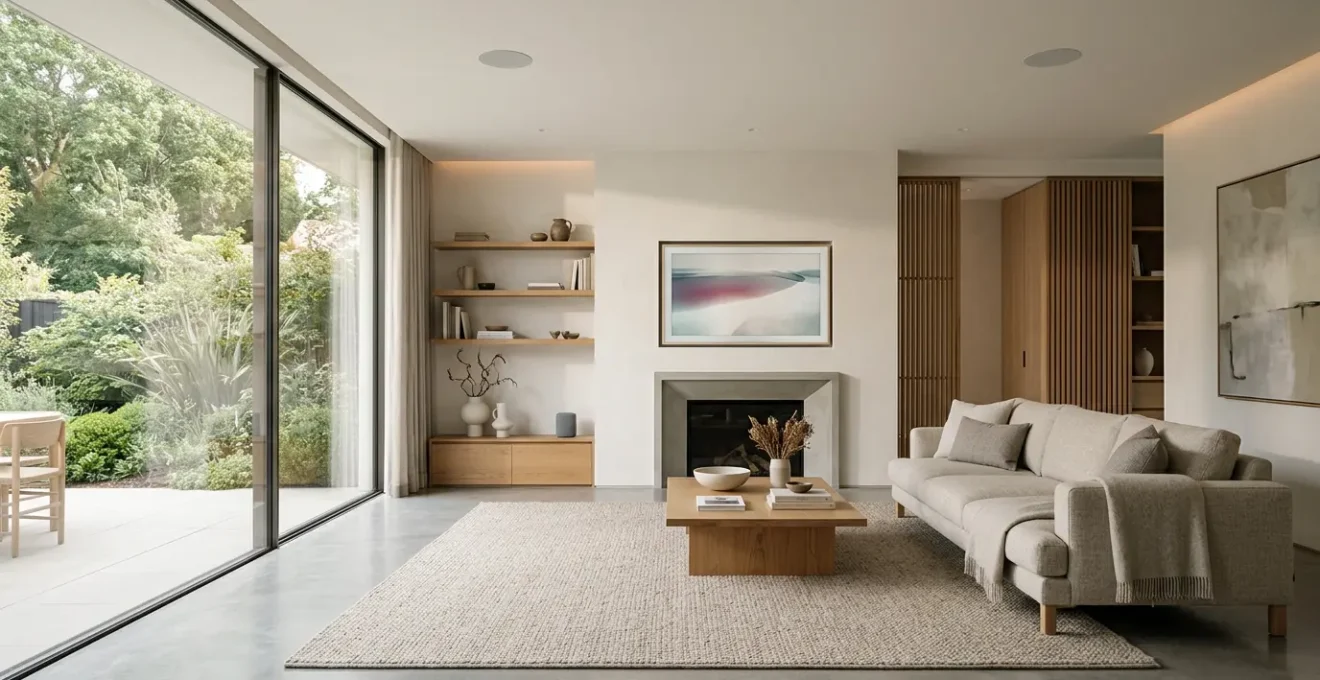
True smart home elegance isn’t achieved by buying prettier gadgets; it’s about architecting an invisible infrastructure that prioritises aesthetics from the very first decision.
- A robust, hidden network is the non-negotiable foundation for a reliable and clutter-free smart home, especially in older UK properties.
- Systemic consolidation using open protocols like Matter and central platforms like Home Assistant is key to eliminating the physical and digital clutter of multiple hubs and apps.
Recommendation: Prioritise your automation journey based on tangible UK benefits: start with heating for return on investment, then add NSI-approved security for safety and insurance perks, and finally layer in lighting for ambience.
You’ve invested time and effort into curating a living space that feels calm, collected, and uniquely yours. The furniture is perfectly placed, the colour palette is harmonious, and the lighting sets just the right mood. Then comes the technology. A plastic smart speaker clashes with your oak mantelpiece, a nest of wires sprouts from behind the TV, and a stack of mismatched hubs blinks away in a corner, turning your serene home into a tech showroom. This is the friction point where most smart homes fail the aesthetic test.
The common advice is often superficial: buy a designer speaker, use a cable tidy, or invest in a single, expensive TV that mimics art. While these are minor improvements, they only patch the problem. They focus on making the gadgets themselves more palatable, rather than addressing the fundamental issue: the visible presence of the technology itself. This approach still leaves you with multiple apps, unreliable connections, and a system that feels bolted-on rather than built-in.
But what if the goal wasn’t to find better-looking technology, but to make the technology itself disappear? The secret to a truly integrated, high-functioning smart home lies in shifting your mindset from products to infrastructure. It’s an aesthetic-first approach where every technical decision—from network topology to device protocols—is made with the final, minimalist look of your room as the primary goal. It’s about creating an invisible architectural layer that delivers seamless functionality without compromising your home’s character.
This guide will walk you through that professional process. We’ll deconstruct the common issues faced in UK homes and provide a strategic framework for planning and installing a smart home that works flawlessly while remaining almost entirely out of sight. From the foundational network to the final speaker placement, you will learn how to make technology serve your home, not dominate it.
Summary: How to Hide Smart Home Tech So Your Living Room Looks Like a Home, Not a Showroom?
- Why Does Your Smart Speaker Lose Connection in the Back Bedroom?
- How to Choose a Smart Meter Display That Talks to Your Home Automation System?
- Apple HomeKit or Matter Protocol: Which Future-Proofs Your UK Smart Home Best?
- The Hub-Hoarding Mistake That Creates 5 Apps for One UK Household
- In What Order Should You Automate Lighting, Heating and Security in a UK Home?
- The Cupboard Chaos Mistake That Undermines Your Minimalist Living Room
- Passive or Active In-Ceiling Speakers: Which Simplifies Wiring in a UK Retrofit?
- How to Install In-Ceiling Speakers During a UK Loft Conversion Without Structural Issues?
Why Does Your Smart Speaker Lose Connection in the Back Bedroom?
The most common point of failure in any smart home is the one you can’t see: the Wi-Fi network. You can have the most advanced devices, but if they can’t talk to the network reliably, they are just expensive paperweights. This problem is especially acute in the UK, where solid brick and stone walls in Victorian and Edwardian properties are notoriously effective at blocking Wi-Fi signals. The free router supplied by your ISP is designed for an open-plan new build, not a home with two-foot-thick internal walls. The result is frustrating dropouts, buffering, and devices that constantly show as « unresponsive » precisely where you want to use them.
Relying on a single, powerful router is a losing battle. The solution is not more power, but better coverage through a distributed system. A mesh Wi-Fi system is a good start, but for a truly robust, invisible infrastructure, professionals take it a step further. We plan the network as an architectural element. This means running physical Ethernet cables as a « wired backhaul » to dedicated wireless access points on each floor. By mounting these discreet access points on ceilings or high on walls, we can deliver a perfect signal that bypasses the dense construction materials, ensuring your smart speaker in the back bedroom has the same flawless connection as the one next to the router.
For situations where running new cables is too disruptive, modern Powerline adapters that use your home’s electrical wiring to transmit data can be combined with mesh technology. This hybrid approach provides a stable backbone without drilling. The goal is to create a seamless web of connectivity that forms the invisible foundation for every other smart device you install.
How to Choose a Smart Meter Display That Talks to Your Home Automation System?
In the UK, every home is being offered a smart meter, complete with a small, portable In-Home Display (IHD). While useful for a quick glance at your energy usage, these standard-issue devices are a classic example of a closed ecosystem. They are designed to show you data, but not to let you use that data. They don’t talk to your other smart home devices, meaning you can’t build automations like turning off high-draw appliances during peak pricing periods. This forces you to have yet another separate, standalone gadget cluttering your worktop.
The professional solution is to bypass the standard IHD and access the data directly from the source. This is achieved with a specific piece of hardware called a Consumer Access Device (CAD). A prime example for UK homes is the Hildebrand Glow, which connects directly to the SMETS2 smart meter’s local network. Unlike the IHD, the Glow CAD is designed to liberate your data. It captures real-time electricity and gas usage and sends it to the cloud, where it can be accessed via an API or MQTT feed—languages your central smart home system can understand.

This single change transforms your smart meter from a passive display into an active component of your home’s intelligence. By integrating this data feed into a platform like Home Assistant, you can create powerful, cost-saving automations. This is the essence of an aesthetic-first approach: replacing a visible, limited-function gadget with an invisible, highly-functional data stream that empowers your entire home.
Apple HomeKit or Matter Protocol: Which Future-Proofs Your UK Smart Home Best?
Choosing a smart home ecosystem can feel like a binding long-term commitment. For years, you had to pick a side: Apple HomeKit, Google Home, or Amazon Alexa. This created « walled gardens » where devices from one brand wouldn’t work with another, forcing you into brand loyalty and limiting your choices. From an aesthetic and practical standpoint, this is a disaster, as it often means you can’t choose the best-in-class device for a job if it doesn’t support your chosen ecosystem. This is a primary driver of hub-hoarding and app-clutter.
The landscape is now changing with the arrival of Matter. Matter is not another platform; it’s a universal language designed to allow devices from different manufacturers to communicate directly with each other, locally and securely. For UK homeowners, this is a game-changer. Major brands like Philips Hue, Eve, and Hive are all committed to Matter, meaning you can build a system with the best lighting, best thermostats, and best sensors, regardless of the brand on the box, and be confident they will work together seamlessly.
While Apple’s HomeKit is known for its strong security and slick user interface, its reliance on Apple-only hardware and a more limited pool of certified devices makes it a less flexible choice for the future. Apple itself has recognised this by rebuilding its own home architecture to be based on Matter. For future-proofing and maximum device choice, building your smart home around the Matter protocol is the most strategic decision. The following table highlights the key differences for UK users, making it clear why Matter is the foundation for a truly consolidated and minimalist smart home.
| Feature | Apple HomeKit | Matter Protocol |
|---|---|---|
| Ecosystem Lock-in | Apple devices only (iPhone, iPad, HomePod) | Cross-platform (Apple, Google, Amazon, Samsung) |
| UK Brand Support | Limited; premium brands; slower Hive adoption | Growing; major brands committed (Philips Hue, Eve, Aqara) |
| Thread Border Router Requirement | HomePod Mini, Apple TV 4K | HomePod Mini, Google Nest Hub, Echo 4th gen, Samsung SmartThings Hub |
| Security Model | Apple-certified, end-to-end encryption, local Siri processing | CSA-certified encryption, but standards set by alliance, not Apple |
| Device Availability (2026) | Stable but limited; native HomeKit support declining | 1,400+ certified devices; expanding rapidly |
| Future Strategy | Apple migrated to Matter-based architecture (late 2025) | Industry standard; 2 spec updates annually |
The Hub-Hoarding Mistake That Creates 5 Apps for One UK Household
You start with a smart thermostat, which needs its own hub and app. Then you add smart bulbs, which come with another bridge and another app. Your video doorbell? A third app. Before you know it, you’ve become a « hub-hoarder. » Your sideboard is a tangled mess of white plastic boxes, each consuming standby power, and your phone is cluttered with multiple apps just to control your own home. This is the opposite of the seamless, elegant experience you were promised. This systemic clutter is the direct result of choosing products in isolation rather than planning an integrated system.
The solution is to create a central « brain » for your home that can speak to all your devices, regardless of their brand. This allows you to consolidate control into a single interface and, in many cases, eliminate the manufacturer’s hubs altogether. The most powerful and flexible platform for this is Home Assistant. It’s open-source software that can run on a small, dedicated device like a Raspberry Pi, hidden away in a cupboard. Home Assistant acts as a universal translator, integrating with thousands of devices across different protocols like Zigbee, Z-Wave, and Wi-Fi.
By adding a simple Zigbee USB stick to your Home Assistant device, for example, you can connect your Philips Hue bulbs directly to it, removing the need for the Philips Hue Bridge entirely. Your Tado heating system, your Ring doorbell, and your smart meter data can all be pulled into this single, unified dashboard. From an aesthetic perspective, the benefit is immediate: you are physically removing redundant hardware from your living spaces. Functionally, you unlock the ability to create powerful automations that cross brands—something that’s impossible when each device lives in its own silo.
Action Plan: Consolidating Your Smart Home Hubs
- Audit Existing Hubs: Make a complete list of every smart device and its required hub (e.g., Philips Hue Bridge, Hive Hub, ISP Router, Echo/Nest). Note which functions are genuinely unique versus redundant control or connectivity.
- Install a Central Hub: Set up Home Assistant on a Raspberry Pi or a dedicated device. This will become your ‘virtual hub’ that integrates with existing protocols like Zigbee, Z-Wave, and Wi-Fi.
- Migrate Lighting Control: Connect a Zigbee USB stick to your Home Assistant device. You can then pair devices like Hue bulbs directly to it, allowing you to decommission and remove the physical Hue Bridge.
- Unify Voice Control: Use Home Assistant’s native Alexa or Google Assistant integration. This creates a single, authoritative interface for voice commands, reducing your reliance on having multiple Echo or Nest devices acting as standalone hubs.
- Calculate Savings: Total the annual energy consumption of all the hubs you plan to decommission. The reduction in standby power draw, combined with potential subscription fees you can cancel, often represents a tangible saving.
In What Order Should You Automate Lighting, Heating and Security in a UK Home?
When starting a smart home project, the sheer number of possibilities can be overwhelming. A common mistake is to automate based on novelty rather than utility, often starting with colourful smart bulbs. A more strategic, aesthetic-first approach involves prioritising automations that provide the most tangible benefit and return on investment first. For a UK homeowner, this creates a clear and logical order of operations: heating, then security, then lighting.
1. Heating: Start with a smart thermostat (like Tado, Nest, or Hive). As one analysis in a UK smart home automation strategy guide states, « It offers the biggest and most immediate ROI for UK homeowners due to the country’s climate and high energy prices, providing a tangible benefit that builds momentum for further automation. » Smart heating provides immediate comfort and cost savings, proving the value of home automation from day one.
2. Security: The second logical step is smart security. This includes video doorbells, smart locks, and monitored alarm systems. The benefit goes beyond convenience. Many UK insurance providers offer premium discounts for homes with professionally certified smart security systems. A system approved by the National Security Inspectorate (NSI) can lead to discounts of 5-15% on home insurance. This makes security a financially astute investment, providing peace of mind while actively saving you money.
3. Lighting: Only after the foundational elements of comfort, cost-saving, and security are in place should you focus on aesthetic automations like smart lighting. This is not to diminish its impact—dynamic, scene-based lighting can completely transform a space. However, its value is maximised when it’s the final, expressive layer built upon a robust and practical smart home foundation. This disciplined order ensures every pound spent adds meaningful, measurable value.
The Cupboard Chaos Mistake That Undermines Your Minimalist Living Room
So, you’ve decided to consolidate your hubs and hide your AV equipment—like a Sky Q box, Apple TV, and amplifier—inside a beautiful piece of custom joinery. The doors close, and the technology vanishes. This is the minimalist dream, but it can quickly turn into a nightmare. Without proper planning, that enclosed cupboard becomes an oven. Electronic devices generate a surprising amount of heat, and without ventilation, they will overheat, leading to performance throttling, random shutdowns, and a drastically shortened lifespan. You’ve traded visible clutter for invisible chaos and unreliability.
Furthermore, how do you control these hidden devices? Standard infrared (IR) remotes require a line of sight, which is now blocked by a solid cabinet door. Getting up to open the cupboard every time you want to change the channel is not a viable or elegant solution. A truly professional installation addresses these two critical challenges—heat and control—from the outset as part of the joinery design.

The key is to treat the inside of the cabinet like a professional server rack. This involves creating a strategy for thermal management and remote control. This doesn’t mean ugly grilles cut into your bespoke cabinetry. Silent, temperature-activated fans can be installed to engage only when needed, drawing cool air in from discreet vents at the bottom and expelling hot air from the top. An IR repeater system solves the control issue: a tiny, almost invisible « IR eye » is placed on the outside of the cabinet, which relays your remote’s commands to emitters placed directly on the sensors of your hidden devices. This combination of considered airflow and control relay is the secret to making hidden technology work flawlessly, as detailed in a professional AV cabinet thermal management checklist.
Passive or Active In-Ceiling Speakers: Which Simplifies Wiring in a UK Retrofit?
For the ultimate in minimalist audio, nothing beats in-ceiling speakers. They deliver immersive sound without occupying a single inch of floor or wall space. But when retrofitting them into an existing UK home, a critical decision arises: should you use passive or active speakers? Active speakers have a built-in amplifier, which sounds convenient, but it means each speaker requires its own mains power connection. In a retrofit scenario, especially in older homes, this is a significant and costly complication.
Imagine trying to install active speakers in a Victorian house with traditional plaster and lath ceilings. A qualified electrician would need to run new 240V wiring to every speaker location, cutting channels into walls and ceilings and installing back boxes. This process is highly disruptive, expensive, and carries a significant risk of causing large sections of the delicate plasterwork to collapse. It’s a prime example of how a seemingly simple tech choice can have major structural and financial consequences.
Passive speakers, by contrast, are the clear choice for a simplified, aesthetic-first retrofit. They have no internal amplifier and are powered by a single, centralized amplifier hidden away in a utility cupboard or AV rack. The only thing you need to run to each speaker is a thin, flexible, low-voltage speaker wire. This wire is far easier and safer to « fish » through ceiling cavities and down walls than mains electrical cable. This approach dramatically simplifies the installation, reduces cost and disruption, and centralizes all the complex electronics in one serviceable location. Should an amplifier fail in the future, it’s easily replaced in the cupboard, rather than requiring an electrician to cut open your ceiling again. This is a perfect illustration of planning for long-term serviceability and minimal architectural impact.
Key Takeaways
- A reliable, wired-backbone network is the non-negotiable starting point for any serious smart home, especially in older UK properties with thick walls.
- Embrace systemic consolidation with open standards like Matter and central platforms like Home Assistant to eliminate the physical and digital clutter of proprietary hubs.
- When concealing tech in joinery, active thermal management and an IR repeater system are not optional luxuries—they are essential for performance and reliability.
How to Install In-Ceiling Speakers During a UK Loft Conversion Without Structural Issues?
A loft conversion is the perfect opportunity for true architectural integration of technology, and in-ceiling speakers are a popular choice to add audio to the new space. However, cutting holes in the ceiling of a newly converted loft is not as simple as it sounds. This structure is now part of your home’s thermal envelope and fire barrier, and any work must comply with strict UK Building Regulations. Failure to do so can compromise your home’s safety, energy efficiency, and even invalidate your insurance.
The first and most critical rule is to never cut or drill into roof joists or trusses without consulting a structural engineer. These timbers are load-bearing, and unauthorised modification can weaken the roof structure. Professional installation involves selecting shallow-depth speakers specifically designed to fit within the standard 400mm or 600mm gap between joists without any structural alteration.
Compliance also extends to fire safety and sound transmission. An acoustic fire hood must be installed over the back of each speaker. This crucial component serves two purposes: it restores the ceiling’s fire rating (typically 30 or 60 minutes) which was compromised by the cutout, and it prevents sound from travelling into the loft space and annoying neighbours in adjoining terraced or semi-detached properties. Furthermore, to meet thermal efficiency standards, you must ensure the insulation is correctly placed around the speaker and fire hood, and that the vapour control layer is perfectly sealed to prevent condensation issues within the roof space. This level of detail is what separates a DIY job from a professional, compliant, and safe installation, as outlined in a regulations-compliant installation process.
Ultimately, achieving a home that is both smart and beautiful requires a paradigm shift. It’s about moving away from the impulse-buy gadgets in high-street stores and adopting the mindset of an architect. By prioritising the invisible infrastructure—the network, the protocols, the power, and the planning—you create a resilient and flexible foundation. This allows you to integrate technology in a way that is supportive, not intrusive; functional, not frustrating; and elegant, not exhibitionist. This is the path to a truly smart home, one that feels like a home, not a showroom.